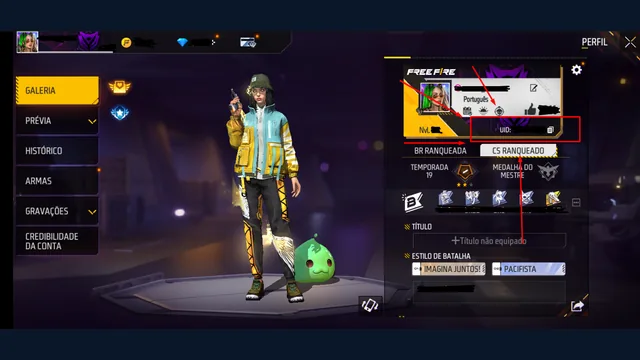
A new phone is a bad place to discover that your Free Fire progress depended on the old one. Before you reset, trade in or uninstall anything, work out whether you are playing as a guest or through a linked login. This guide is a handover checklist for an account you can still open; it is not a method for retrieving deleted game data.
Start while the original account still opens
Garena's binding guidance explains that guest progress is stored on the device and recommends connecting it to a supported platform before reinstalling or changing devices. Its published process starts inside the guest account: open Settings, choose an available account-binding option and sign in to the platform you own. Follow the labels in your current regional app; the available providers can differ.
Do not test the transfer by deleting the original installation. First take a private note of the player UID, nickname and login method. The Free Fire UID guide explains which number identifies the character. A screenshot makes comparison easier later, but a screenshot by itself is not a backup or a login credential.
Check whose platform account is selected
Phones can contain several Google accounts, and a browser or social app may already be signed in as another person. Read the account identity shown during authorization before accepting it. If it belongs to a sibling, a friend, a school account you will lose or an address you cannot open, stop and correct that choice first.
Use a simple private handover note:
- The UID and nickname visible before linking.
- The platform selected for login.
- Whether you can access that platform independently.
- Whether the in-game settings now show the expected linked state.
- Any warning or unfinished step still on screen.
Do not put a password, verification code or recovery secret in a shared family note. Store secrets separately using a secure method you control.
Confirm the destination before retiring the source
Install the official game on the new phone and choose the same linked login. Compare the UID first, then familiar profile details. Similar names are not enough: a newly created character can make a failed handover look like missing progress.
If the UID differs, stop playing and purchasing on that unexpected profile. Check which platform identity was selected rather than trying several random binding changes. Keeping the old phone intact gives you something concrete to compare. If access to the linked platform fails, use the lost bound-account access guide to identify the appropriate recovery route.
Finish the move deliberately
Only retire the old installation after you have confirmed that the intended account opens on the replacement device. Keep the login platform and any recovery mailbox usable; a successful move today does not remove the need to maintain them.
If an error interrupts binding, record the exact message and consult the official help for your region before resetting anything. The goal is a verified handover of the profile you already use, with no dependence on guesswork about which login holds it.