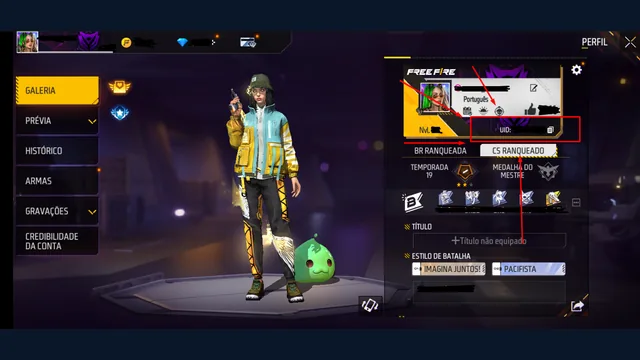
A Free Fire top-up is a purchase with a recipient, a package and a final price. Check those details at the checkout before paying. A diamond goal selected in TERAGAMES is only a planning target; it is not an order or a pack that every regional store sells.
Confirm the intended account
Open the account in the game and copy its numeric player ID from the profile. Compare the entire number after pasting. If a checkout displays a recipient name, use it as an additional check rather than replacing the ID comparison.
The Free Fire UID guide explains where to find the number. If you are buying for someone else, ask them to confirm the account before you continue. Do not use a nickname, email or password in a field intended for a numeric ID.
Compare the package and final total
Start from the purchase option inside the game or the official regional destination it provides. Read the package amount, currency and total shown there. Availability, payment methods and promotions can vary, so a guide should not substitute an old price for the amount you are about to pay.
Decide on a spending limit before comparing packages. Include the charges actually displayed by the checkout. If the total exceeds your limit, select another option or leave the purchase for later. A large goal does not require one large transaction.
Check purchase-linked event conditions
A top-up promotion may have its own qualifying conditions and reward claim. Read those rules before paying, then keep the event details with your purchase record. Our event checklist helps you separate the base diamond purchase from any promotional reward.
A redeem code is a different process. Use the official code-redemption steps when you already have a code, rather than treating a paid checkout as a redemption form.
Keep a useful transaction record
Before leaving the checkout, keep the payment confirmation and receipt supplied by the seller or payment platform. For your own notes, record the recipient, package, amount paid, purchase time and transaction reference. Keep those records private unless the official support process asks for them.
If payment fails or remains pending, read its status before making another attempt. A bank notification, checkout confirmation and in-game balance describe different stages. Compare them so that you can explain where the process stopped.
Paid successfully but diamonds are missing
Check the account that received the purchase and the status of the payment. Consult the seller's or payment platform's current instructions, then use the appropriate Garena regional support route when the issue falls within its scope. Garena's missing-diamonds ticket guidance asks for the payment receipt.
Prepare a short description of what was purchased, when the payment completed and what is missing. Attach the evidence requested by the support form. Do not assume that another purchase will fix the first one, or promise yourself a delivery time that the service has not confirmed.
What the TERAGAMES storefront currently does
The TERAGAMES Top Up preview demonstrates package selection and a checkout summary using example prices. It does not accept payment, create an order or deliver diamonds. Use it to explore the interface, then use an actual authorized purchase destination when you choose to buy.
If an offer claims that entering a UID replaces payment or an official reward condition, read free diamonds with UID explained before continuing.
Source check: 9 October 2026. This article publishes no live price, payment availability or delivery guarantee.