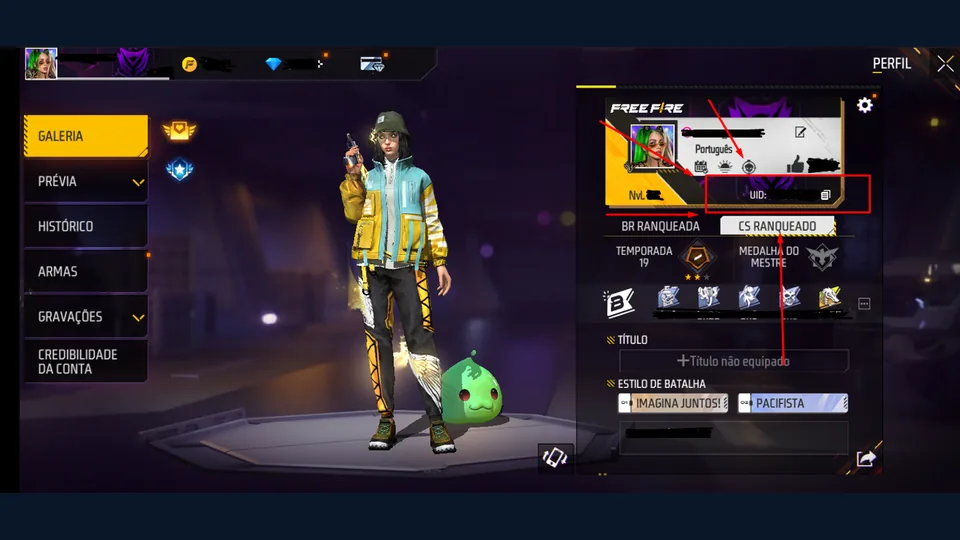
Your Free Fire UID is the numeric identifier for your game account. It is different from the nickname displayed beside your character. Knowing where to find it helps when you need to identify a player, check a top-up recipient or describe an account problem to support. It does not create a diamond reward by itself.
How to find your Free Fire player ID
Garena's account-ID instructions show the ID beneath the nickname in the profile's Gallery area. Start from the game lobby and open your profile by tapping your nickname or profile area. Look for the numeric ID and use the copy button beside it when available. Menu labels and placement can differ between game versions.
- Open the game account you intend to use.
- Open your player profile from the lobby.
- Locate the numeric ID beneath your nickname.
- Copy it with the game's copy control, then compare it with the displayed number.
If the profile layout differs, look for the account identifier rather than copying a guild label or nickname. Keep a screenshot of the profile for your own reference. Before sending it anywhere, crop out information the recipient does not need.
UID, nickname and login are different things
A nickname is the public name people read during play. A UID identifies the account numerically. Your linked login is the platform used to access that account. Treat these as separate fields when filling a form: a box asking for a numeric player ID should not receive your nickname, email or password.
For example, if a checkout shows a player ID field and a recipient name, compare the ID with your profile first, then check the name if the service displays one. A familiar name alone is not enough to confirm that you selected the intended account.
Check a UID before using it
Copying is easier to verify than retyping a long number. Compare the pasted value with the game profile, checking every digit rather than only the beginning. Remove spaces introduced by a message app. If you are helping a friend, ask them to copy their ID directly from their own profile and confirm which account they mean.
A numeric-format check only tells you whether an entry has the expected shape. It does not prove the account exists or belongs to you. TERAGAMES' optional planner checks format and prepares a local plan; it does not look up a Garena account.
What a UID does not do
Typing a UID into a website does not authorize a purchase, verify a reward or transfer diamonds. If an offer combines a UID form with a promised payout, check what official event or purchase actually provides that reward. Read our diamond and UID explanation before treating a loading animation as evidence of delivery.
Keep passwords, recovery codes and one-time login codes private. Use Garena's regional support route for account help. For a purchase, continue with the top-up checkout checklist. For a promotional code, follow the official redeem-code steps instead of entering it into a player-ID field.
A quick check before you continue
- The ID came from the account's game profile.
- You compared the full numeric value after pasting.
- You know whether you are preparing a plan, redeeming a code or making a purchase.
- You have not confused a nickname or login credential with the UID.
Source check: 9 October 2026. This guide explains identification steps; account lookup and support decisions belong to Garena.